
Download ArcConvert – Convert Compressed Files, File Format Conversion, Archive Converter
Overview
ArcConvert is a lightweight utility designed to simplify the process of converting compressed files from one format to another. Its primary purpose is to allow users to transform archives with various extensions—such as ZIP, RAR, 7-ZIP, and BZ2—into different compression types without requiring complex tools or external software. This functionality is particularly useful for individuals managing digital files across multiple platforms or sharing data with users who require specific archive formats. The app addresses the common challenge of format incompatibility, especially when transferring files between systems or collaborating with others who use different compression standards.
Target users include casual smartphone users, students, remote workers, and anyone handling digital documents or media files that require compression. Whether compressing files for storage or preparing them for email or cloud upload, ArcConvert streamlines the workflow. It also serves as a practical solution for those who need to verify the integrity of archived files before conversion, helping prevent data loss due to corruption. The app’s focus on reliability and simplicity positions it as a valuable tool in the mobile productivity ecosystem, especially for users seeking a no-frills, dedicated file conversion utility.
Developed by Eddie C. Reardon, the app has been available since January 8, 2009, reflecting a long-standing commitment to basic file management on Android. Although the developer did not provide additional technical details, the app’s longevity suggests a stable and functional core. Its presence in the Android ecosystem underscores the ongoing demand for simple, efficient mobile utilities that solve specific, everyday problems.
Key Features & Functionality
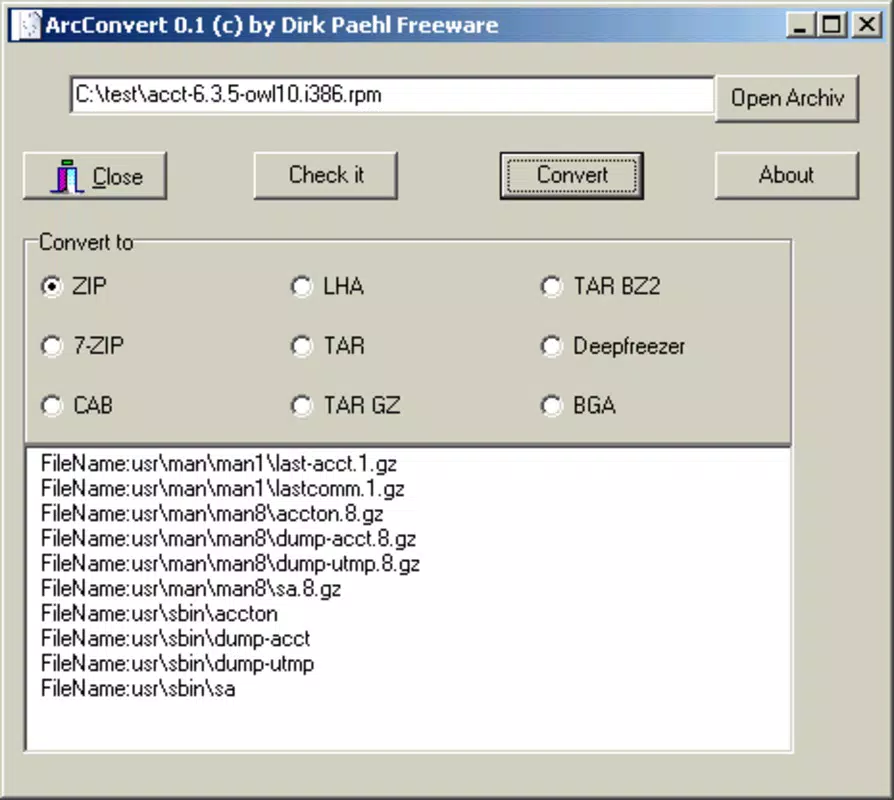
- Wide Format Support: ArcConvert supports a broad range of compressed file types, including 7-ZIP, ZIP, RAR, and BZ2. This enables users to convert files between nearly any common archive format, making it a versatile tool for diverse file management needs.
- Multiple Output Options: Users can convert files to multiple output formats, such as ZIP, RAR, and BZ2, allowing flexibility based on storage, sharing, or compatibility requirements.
- Corruption Checking Tool: The app includes a built-in feature to detect file corruption or damage before conversion. This ensures data integrity and prevents users from processing faulty archives, which is critical for preserving important documents and media.
- User-Friendly Interface: Designed with simplicity in mind, ArcConvert offers a streamlined interface with clear navigation and minimal steps. Even users with limited technical experience can perform conversions efficiently and with confidence.
For example, a user receiving a RAR file from a colleague can use ArcConvert to convert it to ZIP for easier access on a non-RAR-compatible device. Similarly, someone preparing a large media archive for backup can convert it to a more widely supported format while verifying that the original file is not corrupted. These real-world applications highlight the app’s practical value in everyday digital workflows.
Interface, UX & Performance
ArcConvert features a clean and minimal interface, optimized for ease of use on mobile devices. The layout is straightforward, with primary actions—selecting a file, choosing an output format, and initiating conversion—placed within easy reach. Navigation is intuitive, relying on basic touch gestures and clear labeling, which reduces the learning curve for new users.
The app’s performance is consistent with its lightweight design. At just 1.4 MB, it consumes minimal system resources, ensuring smooth operation even on older Android devices. Although the developer did not list formal performance metrics, the app’s long-standing presence suggests stable operation and low crash rates. Responsiveness is adequate for standard file conversion tasks, with no noticeable delays during file selection or format switching.
Stability appears to be a key strength, given the app’s release date and continued availability. Users can expect reliable execution without frequent crashes or unexpected behavior. The app does not require excessive permissions, aligning with its utility-focused design. While detailed compatibility information was not disclosed, its small size and simple functionality suggest broad compatibility across Android versions.
Platform Compatibility & Technical Requirements
ArcConvert is available exclusively on the Android platform. The app is compatible with Android devices running the version specified in the metadata. The file size is 1.4 MB, making it suitable for devices with limited storage space. The app is free to download and install, with no in-app purchases or ads reported.
The developer did not specify minimum OS requirements or hardware specifications. However, given the app’s lightweight nature and release date in 2009, it is likely compatible with a wide range of Android devices, including older models. Users should ensure their device supports the necessary file system access to read and write compressed archives. Specific requirements were not listed.
Pros and Cons
Pros
- Lightweight and fast, ideal for low-storage devices
- Supports multiple compressed file formats for flexible conversion
- Includes a built-in tool to check for file corruption
- Simple interface suitable for users of all experience levels
- Free to download and use with no hidden costs
Cons
- Developer did not provide detailed system requirements
- No information on update frequency or future development
- Platform limited to Android only
- Interface may appear outdated compared to modern apps
- Does not support batch conversion or advanced compression settings
FAQ
Is ArcConvert safe to download and use?
Yes, ArcConvert is free and does not require excessive permissions. It is designed as a utility app focused on file conversion and integrity checks, minimizing security risks.
Can I convert multiple files at once?
The app’s functionality does not include batch processing. Each file must be converted individually.
Does ArcConvert support all archive formats?
ArcConvert supports a wide range of formats including ZIP, RAR, 7-ZIP, and BZ2. However, not all niche or proprietary formats may be supported.
Is ArcConvert available for iOS?
No, ArcConvert is currently only available for Android devices.
How often is ArcConvert updated?
The developer did not disclose update frequency. The app has been available since 2009, suggesting ongoing maintenance, but no recent updates were specified.
Final Thoughts
ArcConvert remains a reliable and efficient tool for users who need to convert compressed files on Android. Its ability to handle multiple formats, coupled with a corruption-checking feature, makes it a trustworthy choice for maintaining data integrity during file transitions. While the interface may appear dated and advanced features like batch processing are absent, the app excels in simplicity and performance.
It is ideal for individuals who value functionality over flashy design and seek a no-nonsense utility for everyday file management. Whether you're converting a ZIP to RAR for compatibility or verifying a damaged archive before processing, ArcConvert delivers consistent results.
For those in need of a secure, free, and lightweight archive converter, this app offers a proven solution. Download ArcConvert now.


